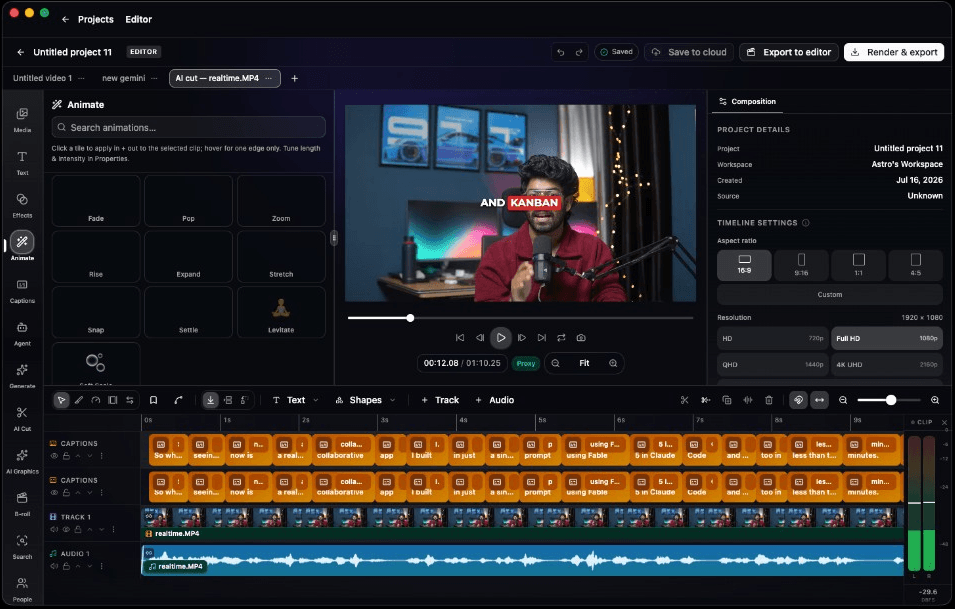
Ninety tools. One instruction.
The agent can inspect footage, cut a rough edit, add captions, build motion, mix audio, generate media, and show the timeline changes for review.
A real multi-track editor with an AI agent built in. Cut by transcript, style captions, mix audio, animate layers and export from the same timeline.
Powered by the world's best AI models

Stop building every cut by hand
Give the editor an outcome, not a list of clicks. Superbloo can assemble, clean, style, mix, and finish on the timeline you already control.
AI takes the first pass. You take over anywhere.
Review the changes, keep what works, undo what does not, or finish the edit yourself. The agent works inside the same project—not in a separate prompt box.
The editor, rebuilt around intent
Give an agent the repetitive work, then shape the result with a professional timeline, color page, captions, motion, audio, and version history.
The agent can inspect footage, cut a rough edit, add captions, build motion, mix audio, generate media, and show the timeline changes for review.
Primaries, HDR wheels, curves, qualifiers, power windows, scopes, looks, and custom LUTs—without leaving the edit.
Remove lines, filler words, and silences from a live transcript; the timeline follows.
Generate and revise titles, lower thirds, and overlays directly on the timeline.
Word timing, emphasis, live previews, and SRT delivery without a round-trip.
Shape transforms in the graph editor with bezier handles and easy ease.
Auto-duck music under dialogue and balance the whole mix in one click.
Create missing video, imagery, voice, music, and effects, then trim them like any clip.
Made in Superbloo
Launch films, creator cuts, product stories, and motion systems made through the same connected creative workflow.
Tech product story
Creator-led skincare
Feature-led social cut
Fast-paced proof
Vertical brand story
New season
Move
different
Prompt-built typography
Maya Chen
Creative director
Editable motion system
Five end-to-end workflows that turn AI output into editable timeline decisions—not another disconnected generation.
Ask for the outcome. The agent can inspect the project, assemble selects, remove pauses, tighten pacing, and return a reviewable set of timeline changes.
Build a tight 30-second cut, lead with the product reveal, and remove dead air.
14 edits readyTurn long footage into a live transcript, remove filler and unwanted lines, then watch those decisions become cuts on the timeline.
The camera is small enough to travel. Um, basically, I think that changes the whole shoot.
Move from primaries and curves to HDR wheels, qualifiers, power windows, scopes, looks, and custom LUTs without opening another application.
Prompt a title card, lower third, or animated overlay and get a motion layer you can revise by prompt, place, trim, and combine with keyframed elements.
Create B-roll, imagery, voice, music, or sound effects with leading models, save the result to the project, and place it directly into the cut.
Generate without leaving the edit
Create video, images, voice, music, and sound effects with leading models, then place the result on the timeline like any other project asset.
Project media
Generate, review, then add to timeline
B-roll and replacement shots
Stills, plates, and references
Voiceover and dialogue takes
Beds shaped for the cut
Transitions and texture
Start in the browser. Move to desktop when the footage gets heavier, the formats get stranger, or your machine should render.
Local library
Use the workstation you already own
Transcribe without uploading a proxy
Find people and moments across footage
FCPXML and XMEML project delivery
Professional interchange
XML workflows for Premiere Pro, Final Cut Pro, and DaVinci Resolve
Export a full edit or marked range as video, audio, or captions—from quick drafts through 4K.
Bring the footage. Direct the agent. Take the controls whenever you want them.
Start editing